The Ultimate Developer Scratchpad for Coding & CLI Snippets
Looking for a fast, offline scratchpad for coding? Benchpad provides syntax-highlighted code blocks, CLI buffers, and instant markdown tables.

The problem: Temporary tabs are a terrible place for temporary code
If you write code for a living, you constantly need a temporary place to hold text.
You need to paste a massive JSON payload from a network tab to inspect it. You need a place to hold a messy stack trace while you switch git branches. You need to draft a complex SQL query or a multi-line curl command before pasting it into the terminal.
Where do you put it?
Most developers just smash Cmd+N in VS Code and paste it into an untitled-1.txt tab. But IDE tabs are fundamentally meant for files. When you close the window, switch workspaces, or your IDE crashes, that temporary tab often gets lost forever.
And if you try to use a standard notes app like Apple Notes or Evernote, the experience is actively hostile. They ruin your formatting, replace straight quotes with curly quotes (breaking your CLI commands), and lack basic syntax highlighting.
The solution: A dedicated, violently simple developer scratchpad
Benchpad is designed as the ultimate scratchpad for coding. We built a very sharp, very fast knife. It gives you a dedicated, permanent place to hold technical text without polluting your IDE tabs or fighting with rich-text formatting.
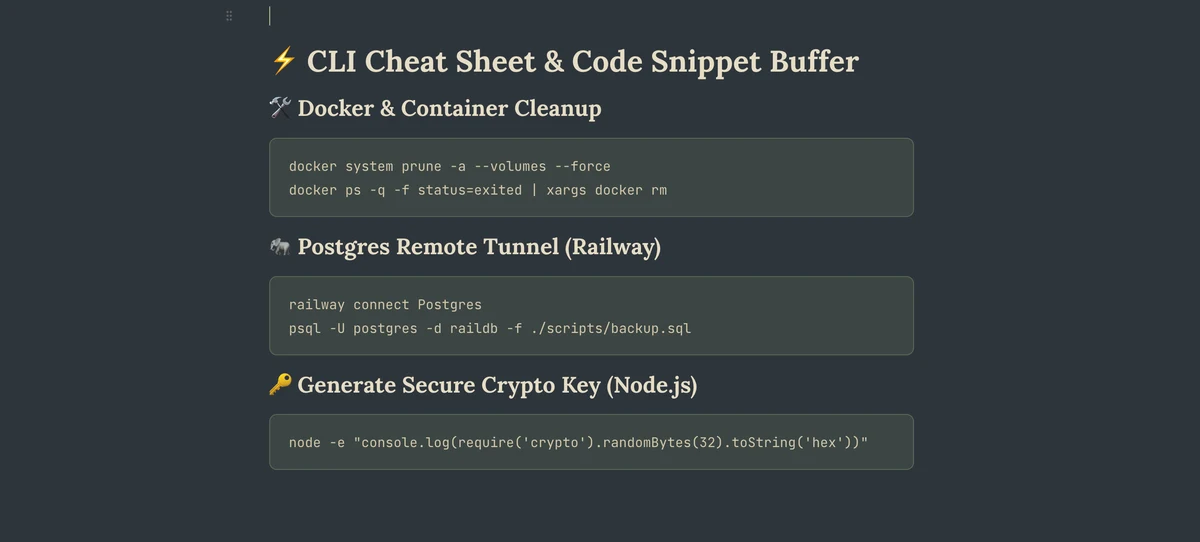 Benchpad App View
A text buffer that actually understands code
Benchpad is a markdown-native block editor that respects your raw data.
- Syntax-highlighted code blocks: Type
/codeto instantly create a block. Benchpad supports native syntax highlighting for JavaScript, Python, Go, Rust, SQL, Bash, and dozens of other languages. - Terminal log buffers: Paste raw stack traces, API responses, or raw CSV data. Benchpad uses a monospaced font by default in its code blocks, keeping your data perfectly aligned.
- One-click copy: Every code block has a dedicated copy button, allowing you to copy the snippet cleanly back into your terminal or editor without accidentally selecting surrounding text.
- No smart quotes: The editor will never automatically change your straight quotes to curly quotes or capitalize your variable names.
Three fixed pads, zero file management
Instead of creating a graveyard of untitled files, Benchpad gives you exactly three permanent pads.
Many developers use a specific pad (e.g., their Code pad) exclusively as a CLI buffer. You just hit a global hotkey, paste the JSON, format it, and close the window. The data is safely persisted to local storage instantly. There is no "Save As" dialog, no folder to select, and no file to name.
Works perfectly offline
When you are debugging a script on a flaky train Wi-Fi connection, you still need your scratchpad. Benchpad is built entirely offline-first. Your code snippets are saved to IndexedDB (or local storage in the native apps) before any network request is even attempted.
If you paste a curl command on your laptop while offline, it merges flawlessly with edits from your phone when you reconnect via a CRDT engine. No data is lost.
Stop polluting your IDE
Keep your editor focused on your codebase, and keep your temporary thoughts in a dedicated buffer.
Start coding with Benchpad for free
Related: For developers · Scratchpad app · Note app for ADHD
Frequently Asked Questions
Why do developers use Benchpad instead of VS Code temporary tabs?
VS Code temporary tabs (untitled-1) get lost when closing windows or switching branches. Benchpad persists your code snippets offline with full syntax highlighting across devices.
Get Benchpad
On every platform
Native apps for iPhone & Android, and a Mac menu bar & Windows tray app — same three pads, offline-first, synced everywhere.