The Fast, Offline Windows Scratchpad App
Looking for a clean Windows scratchpad app? Benchpad delivers instant offline text capture, markdown tables, and code snippets for Windows 10 & 11.

The problem: Windows users are forced into extreme trade-offs
If you use a Windows PC for work or personal use, you have historically been forced to choose between two extreme note-taking options.
On one end of the spectrum is Windows Notepad. It opens instantly, but it is entirely devoid of features. You can't format text, you can't insert a checklist, and crucially, your notes are trapped on that single PC. If you walk away from your desk, the phone number you just typed into Notepad is completely inaccessible from your phone.
On the other end of the spectrum are the massive, heavy enterprise applications like Microsoft OneNote or Notion. These apps have every feature imaginable, but they are incredibly slow. When you just need to jot down a quick tracking number, you have to wait five seconds for a loading spinner, navigate a complex folder hierarchy, and create a new titled document.
Windows users lack a middle ground: a fast, local scratchpad that doesn't feel like operating heavy machinery.
The solution: A minimalist, offline-first Windows scratchpad
Benchpad brings a clean, cross-platform scratchpad to Windows 10 and 11. We built a very sharp, very fast knife.
It bridges the gap by providing the instant, sub-50ms opening speed of Notepad, while offering the block-based markdown formatting and automatic cloud sync of a modern application.
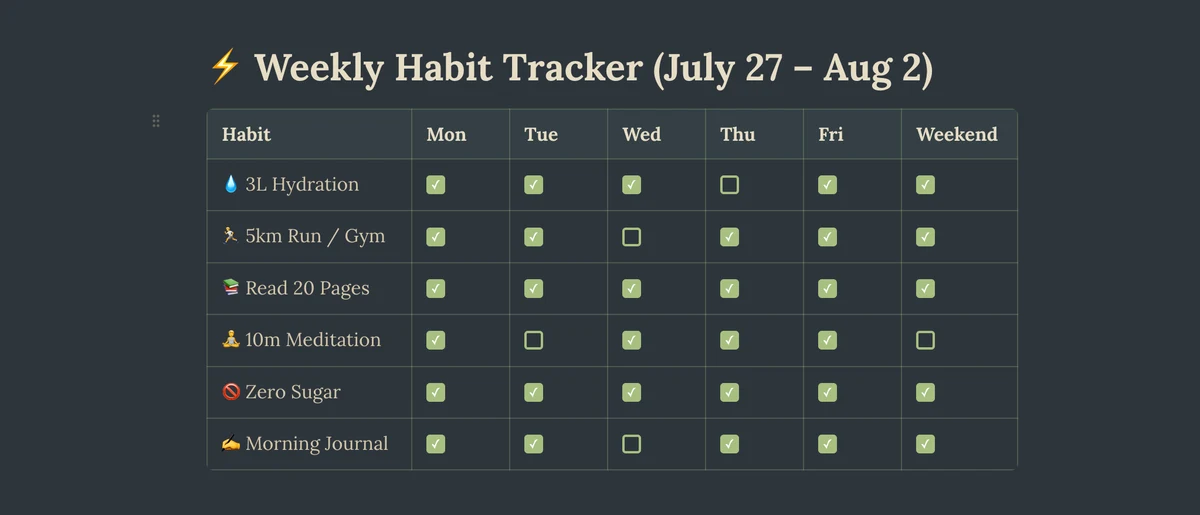 Benchpad App View
Instant keyboard speed
Benchpad is an offline-first application. It saves your text immediately to a local IndexedDB database before it ever attempts to contact a server.
Because it doesn't wait for a Microsoft Account authentication check or a cloud sync spinner, it opens instantly. When you need to capture a thought, Benchpad is ready before you finish typing your first character.
Rich markdown support
Unlike the plain text of Notepad or the chaotic UI of Windows Sticky Notes, Benchpad is a full block editor that you can control entirely with your keyboard.
- Type
- [ ]to instantly create a daily to-do checklist. - Type
/tableto instantly insert a budget grid or a habit tracker. - Type
/codeto format developer snippets or CLI commands with proper syntax highlighting.
Cross-platform sync
A scratchpad is only useful if it is with you when you need it.
Edits made on your Windows PC sync seamlessly in the background. Because Benchpad is also a native iOS and Android app, you can write a grocery list on your Windows laptop at work, and open it instantly on your iPhone at the store.
If you edit the same pad on both devices while offline, Benchpad uses CRDTs (Conflict-Free Replicated Data Types) to merge the changes perfectly when you reconnect.
Upgrade your Windows scratchpad
Stop choosing between plain text and heavy enterprise databases. Get a scratchpad that does exactly what you need, and nothing more.
Download Benchpad for Windows for free
Related: Sticky notes alternative · Benchpad vs OneNote · Offline note app
Frequently Asked Questions
Does Benchpad run on Windows 10 and 11?
Yes. Benchpad runs in any browser and installs as a progressive desktop app on Windows 10 and 11, storing data locally offline.
How does Benchpad compare to Windows Sticky Notes or Notepad?
Windows Notepad lacks task checkboxes, tables, and cross-device sync. Windows Sticky Notes quickly turn into desktop clutter. Benchpad provides three structured scratchpads with rich markdown support.
Get Benchpad
On every platform
Native apps for iPhone & Android, and a Mac menu bar & Windows tray app — same three pads, offline-first, synced everywhere.