Benchpad blog
How Students Take Distraction-Free Lecture Notes and Track Exams in Benchpad
Ditch heavy PDF tools and bloated note apps. Learn how university students take lightning-fast markdown lecture notes and track assignments offline on laptop or iPad.

College lectures move fast.
If your note-taking app takes 5 seconds to open, requires clicking through nested folders, or forces you to deal with rich text format lag, you end up missing half the professor's lecture points.
Students need an environment that is keyboard-first, battery-efficient, offline-ready, and 100% focused on text density.
Here is how college and graduate students use Benchpad to capture lecture notes, manage assignment deadlines, and track course grades effortlessly.
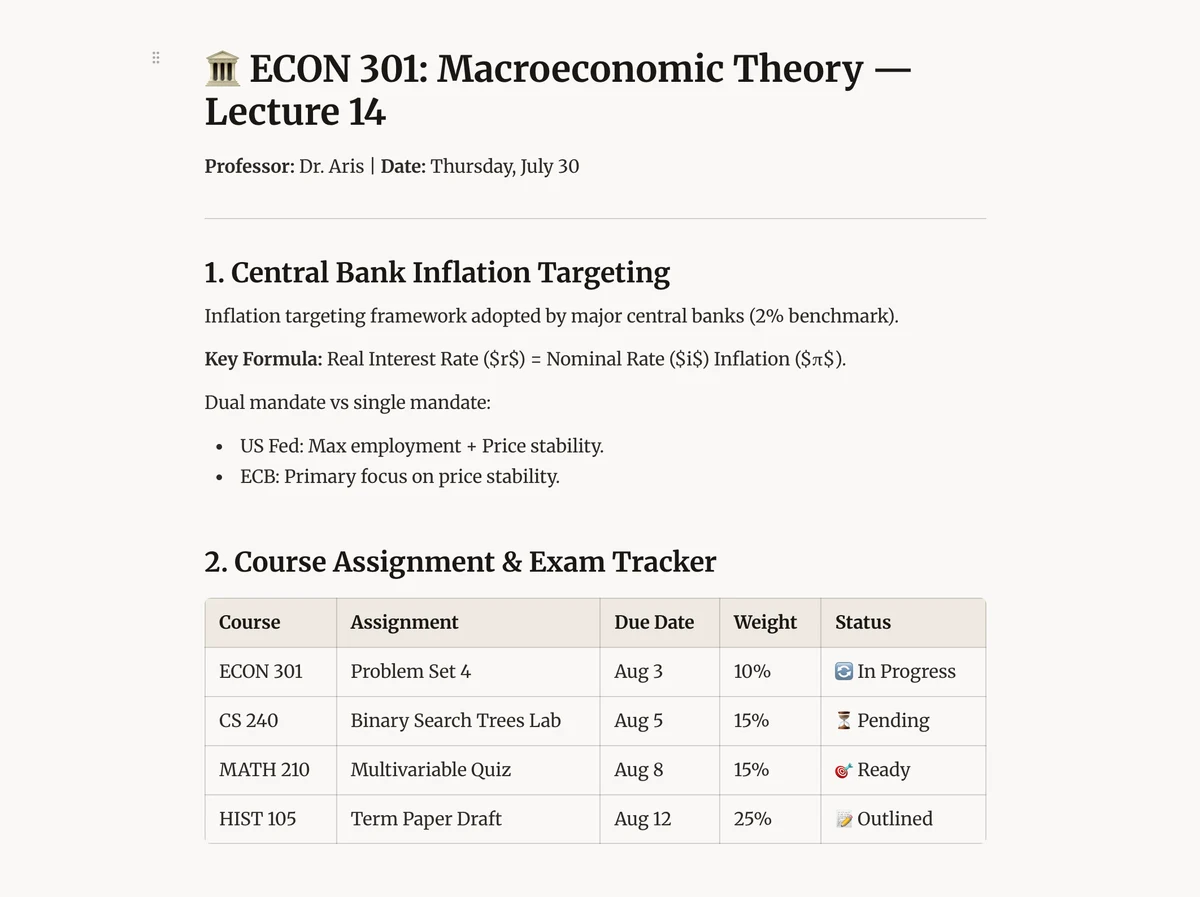 Benchpad Student Paper Cream Theme
1. Structuring Lecture Notes for Instant Review
During a lecture, formatting should happen naturally as you type. Benchpad supports full Markdown syntax and slash commands (/):
🏛️ ECON 301: Macroeconomic Theory — Lecture 14
Professor: Dr. Aris | Date: Thursday, July 30
1. Central Bank Inflation Targeting
- Inflation targeting framework adopted by major central banks (2% benchmark).
- Key Formula: Real Interest Rate ($r$) = Nominal Rate ($i$) - Inflation ($π$).
- Dual mandate vs single mandate:
- US Fed: Max employment + Price stability.
- ECB: Primary focus on price stability.
2. Monetary Policy Transmission Channels
- Interest Rate Channel: Lower cash rate → Lower borrowing costs → Increased investment.
- Exchange Rate Channel: Lower rates → Capital outflow → Currency depreciation → Export growth.
- Asset Price Channel: Lower rates → Higher equity & real estate valuations.
💡 Exam Hint from Prof: Be prepared to derive the IS-LM curve under quantitative easing in Midterm 2.
2. Creating a Markdown Exam & Assignment Tracker Table
Keeping track of homework deadlines, midterms, and grade weightings across 4-5 classes can easily cause overwhelm.
Using Benchpad's native Markdown table editor, build a clean Course Master Table:
| Course | Assignment / Exam | Due Date | Weight | Status | Grade |
|---|---|---|---|---|---|
| ECON 301 | Problem Set 4 | Aug 3 | 10% | 🔄 In Progress | - |
| CS 240 | Binary Search Trees Lab | Aug 5 | 15% | ⏳ Pending | - |
| MATH 210 | Multivariable Calculus Quiz | Aug 8 | 15% | 🎯 Ready | - |
| HIST 105 | Term Paper Draft | Aug 12 | 25% | 📝 Outlined | - |
| CS 240 | Midterm Exam | Aug 18 | 35% | 📅 Scheduled | - |
 Benchpad Student Assignment Tracker Table
3. The Paper Cream Light Theme & iPad Support
While dark mode is great for nighttime coding, daytime lectures in bright classrooms call for high contrast.
Benchpad includes the Paper Cream Theme — a warm, warm-toned light theme paired with iA Writer Mono typography designed specifically to reduce eye strain during hours of reading and typing.
Additionally, Benchpad is fully optimized for iPad and tablet keyboards, responding to touch and coarse-pointer interactions seamlessly.
The Student 3-Pad Setup
- Pad 1:
Lectures & Daily→ Active day's lecture notes, quick professor quotes, daily to-do list. - Pad 2:
Assignments & Grades→ Master exam tracker table, assignment requirements, project links. - Pad 3:
Study Summaries→ Formula cheat sheets, vocabulary lists, long-form essay outlines.
Get Benchpad
On every platform
Native apps for iPhone & Android, and a Mac menu bar & Windows tray app — same three pads, offline-first, synced everywhere.
Benchpad
Try it free.
No credit card required.