Benchpad blog
How to Build a Minimalist Habit Tracker with Markdown Tables in Benchpad
Ditch bloated habit-tracking apps. Learn how to track habits, weekly streaks, and daily reflections using Benchpad's native markdown tables and task lists.

Habit tracking shouldn't feel like managing a database.
Most modern habit apps suffer from feature creep: daily streak reminders, notification badges, social leaderboards, and complex analytics. You spend more time logging in, tapping icons, and managing notification settings than actually building habits.
The most reliable habit tracker is one with zero friction, instant loading, and zero guilt.
Here is how you can use Benchpad's native Markdown Tables and Task Checklists to build a clean, distraction-free habit tracker that lives right inside your daily scratchpad.
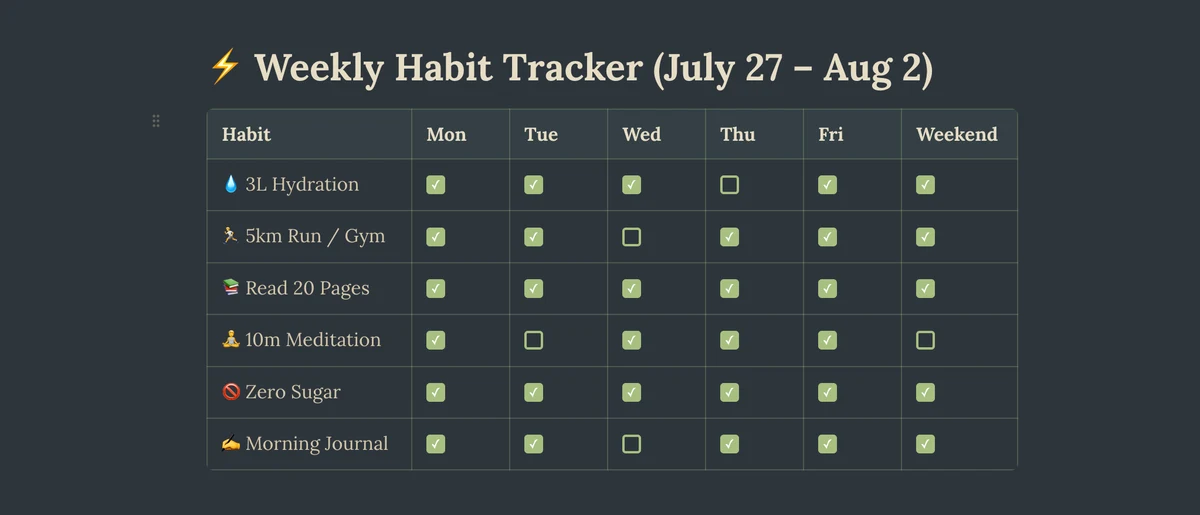 Benchpad Habit Tracker Table
Why Markdown Tables are Superior for Habit Tracking
When you track habits in a markdown table inside Benchpad:
- Everything is visible at a glance: Your whole week or month is rendered on a single screen without horizontal scrolling fatigue.
- Instant keyboard editing: No dropdown menus or date pickers. Type
x,✓, or-directly from your keyboard. - Offline & persistent: Works on an airplane, in a subway tunnel, or deep in the woods. Your habit log never hangs waiting for a cloud API call.
- No artificial streak guilt: Missed a day? Simply leave the cell blank or add a short note on why. No red warning banners or reset counters.
Step 1: Setting Up Your Weekly Habit Matrix
In Benchpad, type /table or use standard Markdown table syntax to create your grid.
Here is a ready-to-copy template for a weekly habit matrix:
| Habit | Mon | Tue | Wed | Thu | Fri | Sat | Sun | Target |
|---|---|---|---|---|---|---|---|---|
| 💧 3L Water | ✓ | ✓ | ✓ | ✓ | ✓ | 7/7 | ||
| 🏃 5km Run / Workout | ✓ | - | ✓ | - | ✓ | 4/7 | ||
| 📚 Read 20 Pages | ✓ | ✓ | ✓ | ✓ | 6/7 | |||
| 🧘 10m Meditation | ✓ | ✓ | ✓ | ✓ | ✓ | 7/7 | ||
| 🚫 No Sugar / Alcohol | ✓ | ✓ | ✓ | ✓ | 5/7 | |||
| ✍️ Morning Journal | ✓ | ✓ | ✓ | ✓ | ✓ | 7/7 |
Pro Tip: Using Benchpad's Interactive Table Editor
Benchpad's Tiptap editor automatically styles markdown tables with sleek borders, header highlights, and easy column alignment controls. You can add or remove rows with a single right-click or shortcut.
Step 2: Combining Tables with Daily Action Checklists
While the weekly table provides macro visibility, your daily micro-actions belong in a simple checklist beneath the table.
Today's Micro-Habits (Thursday)
- Drink 1L water upon waking
- 10-minute morning breathwork
- Read 20 pages of Atomic Habits
- Read zero news before 12 PM
- Evening reflection & shutdown write-up
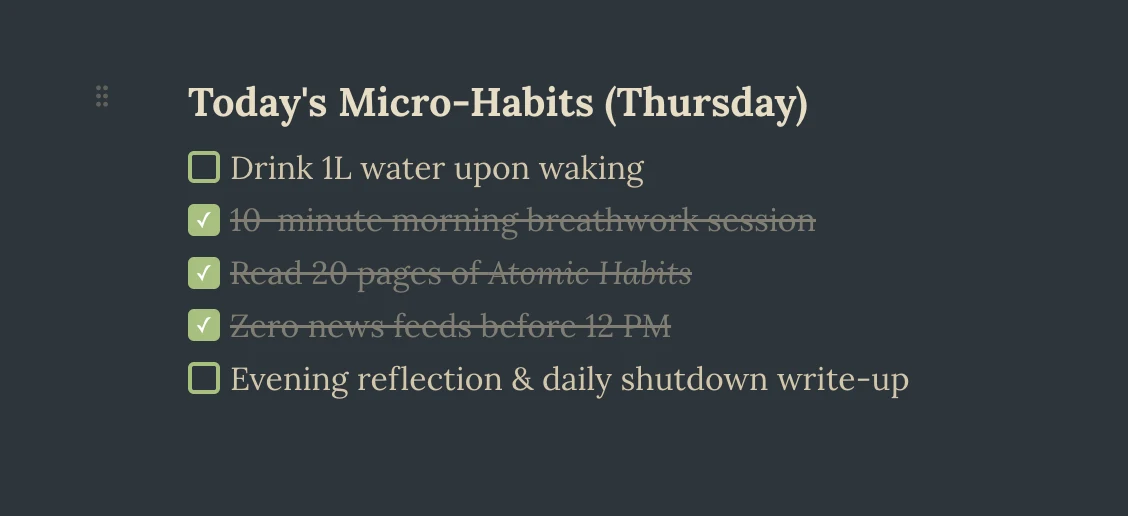 Benchpad Daily Habit Log
Step 3: Organizing Your 3 Scratchpads for Habits
With Benchpad's 3 Scratchpad System, you don't need hundreds of files or sub-folders. Here is how top self-optimizers configure their 3 pads:
- Pad 1:
Today→ Daily task list, immediate focus area, current habit checklist. - Pad 2:
Habits & Logs→ Weekly habit matrix, monthly health goals, workout notes. - Pad 3:
Ideas & Journal→ Long-form daily reflections, breakthrough thoughts, weekly review.
The Takeaway
Habit tracking works best when the tool recedes into the background. You don't need a $10/month habit app with 45 features you never tap.
Open Benchpad, create a 7-column table, and start checking off your wins. Clean, private, and always available offline.
Get Benchpad
On every platform
Native apps for iPhone & Android, and a Mac menu bar & Windows tray app — same three pads, offline-first, synced everywhere.
Benchpad
Try it free.
No credit card required.