Benchpad blog
How Engineering Managers & Executives Run Productive 1:1 Meetings
Stop running disorganized 1:1s. Learn how engineering managers use Benchpad's collapsible callouts and nested checklists to track career growth, feedback, and action items.

As an Engineering Manager, Director, or Executive, 1:1 meetings are your most critical tool for team alignment, coaching, and trust-building.
Yet most managers struggle with 1:1 organization:
- Notes scattered across dozens of individual Google Docs.
- Action items forgotten between weekly catch-ups.
- Career goals lost in Slack threads.
Here is how top engineering leaders use Benchpad as a private, structured 1:1 meeting workspace with zero friction.
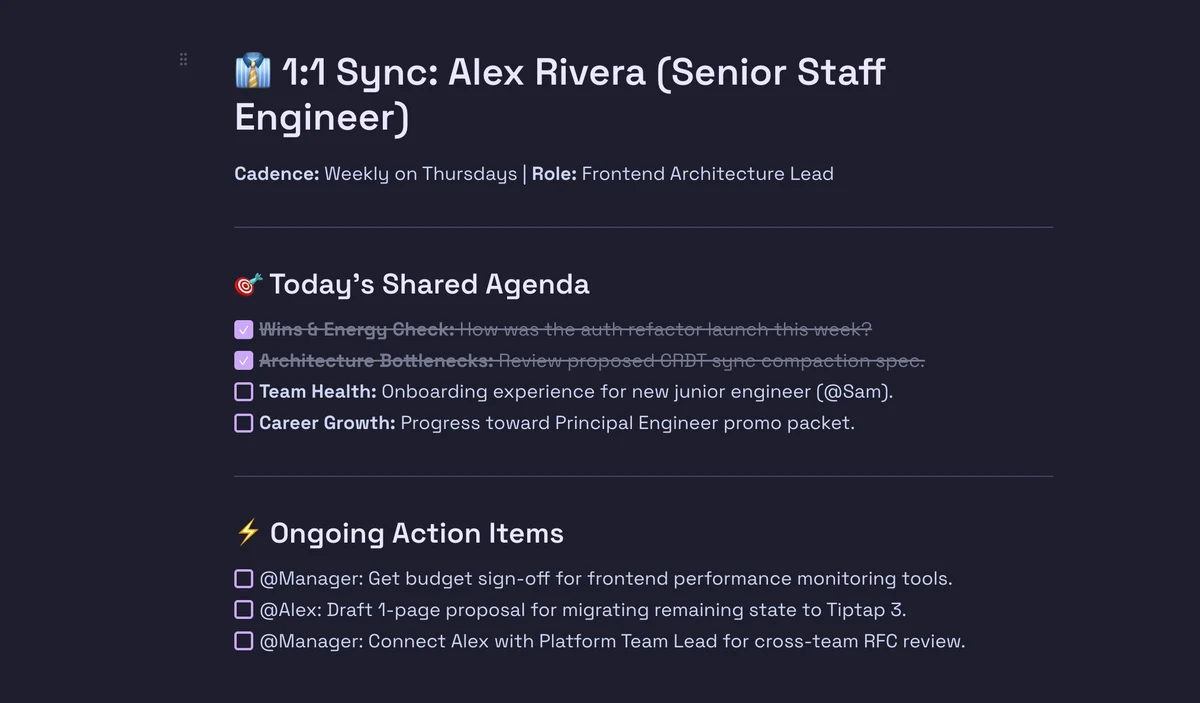 Benchpad Executive 1:1 Meeting Agenda
The Master 1:1 Agenda Template
In Benchpad, structure each team member's 1:1 notes into three core buckets: Today's Agenda, Action Item Tracker, and Collapsible History.
👔 1:1 Sync: Alex Rivera (Senior Staff Engineer)
Cadence: Weekly on Thursdays | Role: Frontend Architecture Lead
🎯 Today's Shared Agenda
- Wins & Energy Check: How was the auth refactor launch this week?
- Architecture Bottlenecks: Review proposed CRDT sync compaction spec.
- Team Health: Onboarding experience for new junior engineer (@Sam).
- Career Growth: Progress toward Principal Engineer promo packet.
⚡ Ongoing Action Items
- @Manager: Get budget sign-off for frontend performance monitoring tools.
- @Alex: Draft 1-page proposal for migrating remaining state to Tiptap 3.
- @Manager: Connect Alex with Platform Team Lead for cross-team RFC review.
▶ Q2 Career & Feedback Goals (Click to Expand)
- Primary Goal: Lead the core offline-first sync architecture rewrite.
- Feedback from last review: Increase visibility across engineering leadership by presenting at Tech All-Hands.
- Target Promotion Window: Q4 Review Cycle.
Using Collapsible Callouts for Meeting History
Instead of creating 52 separate files per year for weekly 1:1s, keep a single running pad per team member and use Benchpad's Collapsible Callouts (/callout or /section) for past weeks:
▶ Meeting History — July 23, 2026
- Discussed sprint scope creep on payment gateway integration.
- Agreed to defer multi-account switching logic.
- Alex noted feeling stretched on code reviews; allocated Sam to assist.
▶ Meeting History — July 16, 2026
- Quarterly goal check-in. All green.
- Resolved friction around API contract changes with backend team.
This approach keeps past context immediately accessible via a single click while maintaining a clean, distraction-free view of today's agenda.
 Benchpad Collapsible Meeting History
Why Executives Choose Benchpad
- Privacy & E2EE Peace of Mind: 1:1 notes contain sensitive performance, compensation, and team feedback. Benchpad encrypts data transparently and offers offline-first local storage.
- Instant Search & Outline Navigation: Jump between section headings and team members instantly using the keyboard.
- No Loading Spinners: Opens in sub-50ms when an employee walks into your office or joins your Zoom room.
The Manager 3-Pad Layout
- Pad 1:
Team 1:1s→ Active 1:1 agendas, action items, growth goals for direct reports. - Pad 2:
Leadership & Strategy→ Executive team updates, headcount planning, budget notes. - Pad 3:
Personal Scratchpad→ Daily task checklist, quick ideas, personal development notes.
Get Benchpad
On every platform
Native apps for iPhone & Android, and a Mac menu bar & Windows tray app — same three pads, offline-first, synced everywhere.
Benchpad
Try it free.
No credit card required.